Your first board list, from sizes to a PDF
You do not need to know the formula before you start. You do need to know which sizes you are entering: the dimensions a supplier charges for, or the dimensions you have measured. Keep that choice consistent through the list.
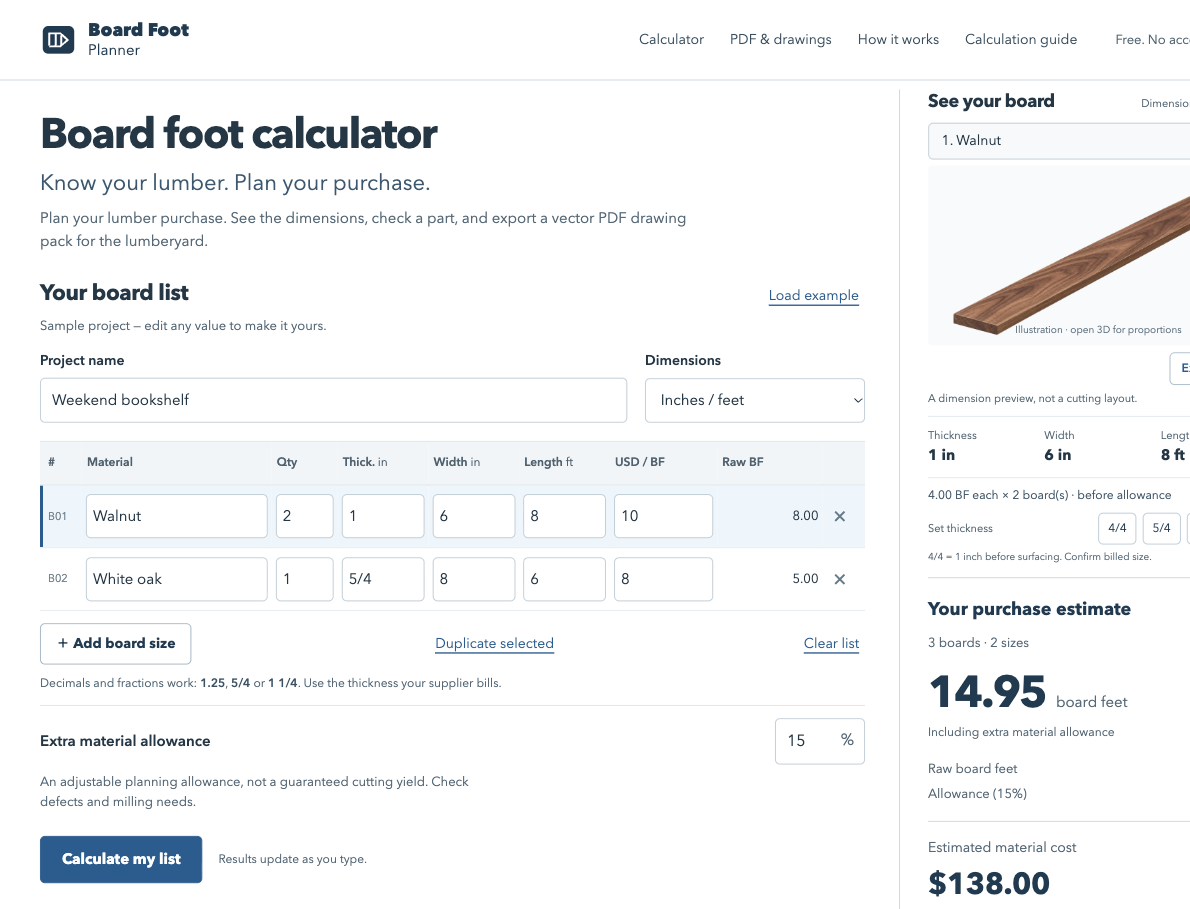
The calculator opens with a sample called “Weekend bookshelf.” It is there to show how the fields work. Replace it with your own list, or follow along with the sample first.
1. Choose the units before entering sizes
In Inches / feet, thickness and width are inches, but length is feet. An eight-foot board needs 8 in the length field, not 96. In metric mode, thickness and width are millimetres, and length is metres.
Changing the unit selector converts a valid list. It does not change the currency: prices are always USD per board foot. If the supplier prices by the piece or linear foot, do not paste that number into the price field.
2. Give each size its own row
For two matching walnut boards, enter material “Walnut,” quantity 2, thickness 1, width 6, and length 8. This row contains 8.00 BF before allowance. Put a different size or price on another row.
The thickness field accepts a decimal or a fraction: 1.25 and 5/4 both mean 1¼ inches. “Material” is a label for your list; choosing walnut does not fetch a market price.
3. Check the allowance and price
The starting 15% allowance is an example, not a rule for every job. Change it to suit the stock and your plan. It adds volume to the estimate; it does not add extra boards to the drawing.
A blank price means “not priced,” not free. If you enter $10 per BF for the walnut row, its 8 BF becomes 9.20 BF with 15% allowance, costing $92.00. Press Calculate my list to check the list before using it. If a field is highlighted, correct it first.
4. Keep a copy you can find again
Save on this device keeps one project in this browser. A later save replaces that copy. Use Restore saved when you return; the site does not automatically replace the sample with your saved project. For a separate file, download the CSV or PDF.
5. Choose the export you need
- Download CSV gives you a list for a spreadsheet.
- Purchase PDF only gives you the purchase worksheet.
- Download vector PDF pack adds dimension sheets. Choose A4 or US Letter and all sizes or the selected board.
- Selected board SVG gives you one editable vector dimension sheet.
You can add a revision and notes, or leave prices out of the purchase PDF. Print dimension sheets at 100% / Actual size on the matching paper. Use the labeled dimensions, even when a thin board looks tiny on the page.
These are stock reference drawings. They do not tell you where to cut joints or how to arrange all the parts. Before ordering, check usable sizes with the lumberyard.
Walk through the sample purchase estimate →
Updated November 25, 2026